We make switching easy.
Paste an API key and Knowpoint brings your organizations, devices, flexible assets, passwords and documents across for you. You see exactly what will move before anything does.
Three steps, and you're done
Admin → Export & import → Migrate. No spreadsheets, no scripts, no consultants.
Connect with an API key
Paste an IT Glue or Hudu API key. Knowpoint only reads from it, and lists your organizations and layouts. Nothing moves yet.
Choose what comes across
Pick the sections and organizations to bring over. For Hudu, choose what each asset layout becomes: devices, contacts, locations or a flexible asset type.
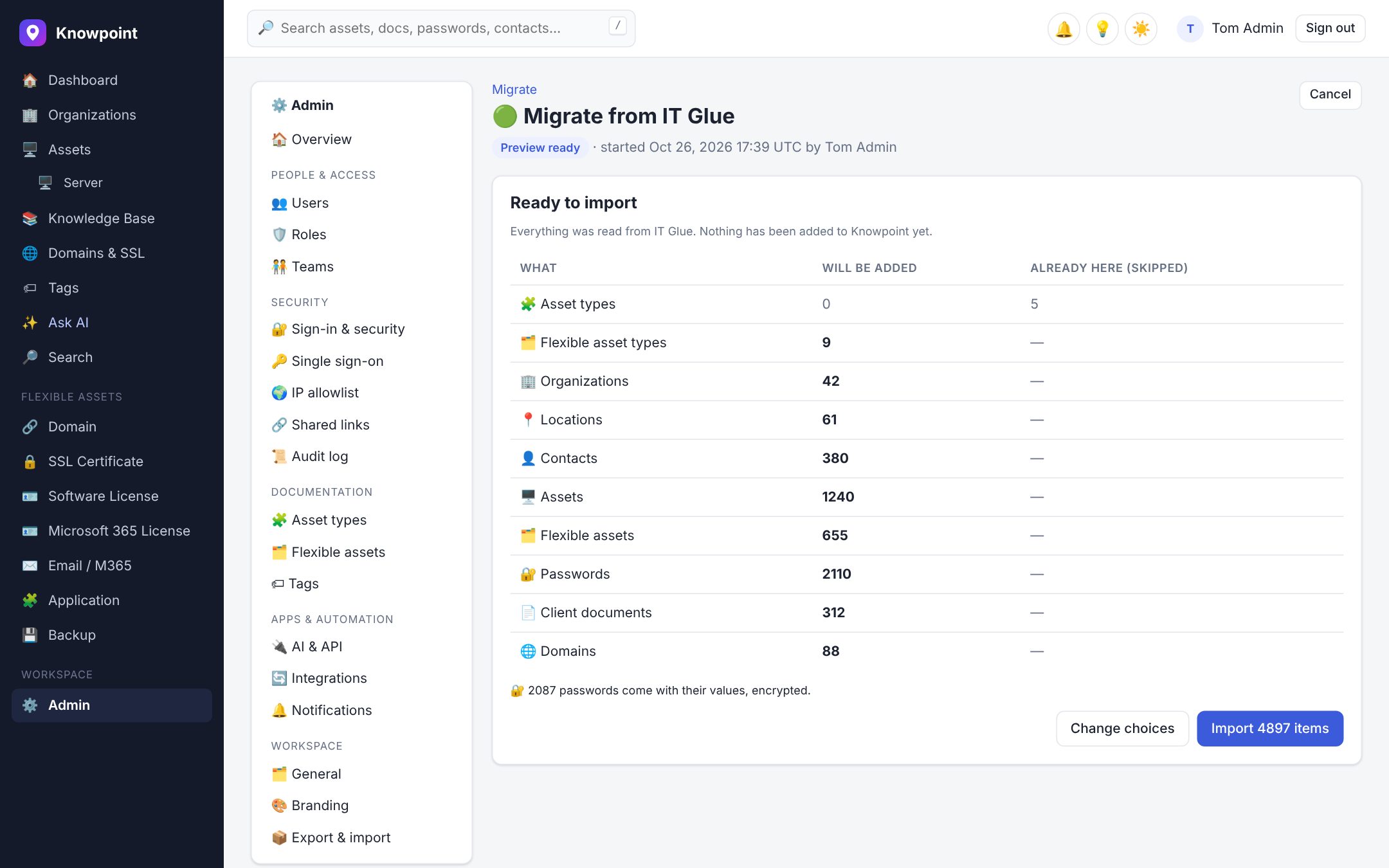
Preview, then import
See exactly how many of everything will be added, and what already exists, before anything changes. Then import in one click.
Everything comes across
Each kind of item lands where it belongs, with the links between them intact.
| IT Glue | Hudu | In Knowpoint |
|---|---|---|
| Organizations | Companies | Organizations |
| Locations | Company addresses | Locations |
| Contacts | People layouts | Contacts |
| Configurations | Computer and device layouts | Assets, in the right asset type with hardware fields filled in |
| Flexible assets | Other asset layouts | Flexible assets, with the same fields |
| Passwords | Asset passwords and password fields | Passwords, encrypted the moment they arrive |
| Documents | Articles | Documents and the Knowledge Base |
| Domains | Websites | Domains, with expiry monitoring |
Switch without the risk
- Nothing gets lost
Fields that don't have an equivalent are kept in the item's notes, and links between items come across as related items.
- Run it again before you switch
Keep working in your old tool while you try Knowpoint. Running the migration again only adds what's new, never duplicates.
- Your key doesn't stay
The API key is encrypted while the migration runs, and deleted the moment it finishes or is cancelled.
- Read-only, always
Knowpoint never changes anything in IT Glue or Hudu. Every step is recorded in your audit log.
Questions about switching
How long does it take?
It depends on how much you have: smaller accounts take minutes, very large ones longer. It runs in the background, so you can leave the page and come back to the preview.
Can we keep using IT Glue or Hudu while we try Knowpoint?
Yes. Migrate during your free trial, keep working as usual, then run it again just before you switch over. Only new items are added.
Do passwords come across?
Yes, with their values, as long as the API key is allowed to read passwords. They're encrypted with your workspace's own key as soon as they arrive.
What about documents?
Hudu articles come across in full. IT Glue documents come across with their content where IT Glue's API provides it; any that it doesn't link back to the original, so you can copy them over.
Is the migration tool extra?
No. It's included for everyone, in the free trial too. No migration fees.
Moving from something else?
Import CSV exports and spreadsheets with templates for every section, or paste an old handover document into AI import and choose what to keep. Talk to us and we'll help you plan it.
Want the details first? Read the migration guide.
Bring your documentation home.
Start a free trial, connect your old tool and see the preview today. Your current tool stays exactly as it is.