MSP documentation for every client, in one place
Managed service providers document dozens of environments at once. Knowpoint keeps every client's assets, passwords, networks and runbooks organized, current and one search away, so any technician can pick up any ticket.
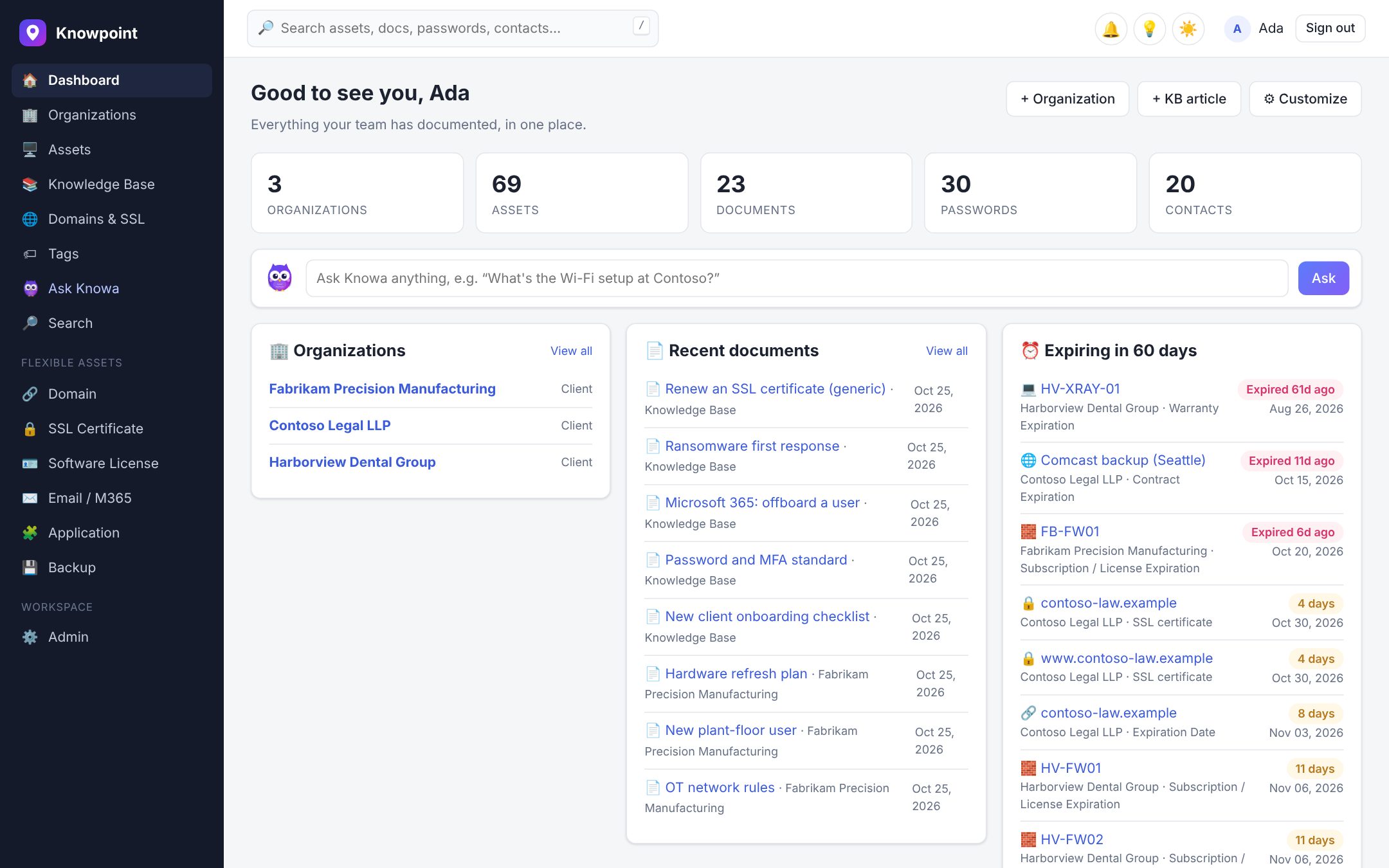
Built around how MSPs work
An MSP's documentation is many small IT departments side by side. Each client has its own sites, users, devices, vendors and quirks, and technicians jump between them all day. Knowpoint gives each client an organization with everything about it on one page, and a global view across all of them when you need it.
- Organizations with locations, contacts, assets, passwords, documents and domains on tabs
- Quick notes for the things every technician should know at a glance
- A global knowledge base for procedures that apply to every client
- Roles, teams and per-organization access, so people see only the clients they work on
Synced from your PSA and RMM
Your PSA already knows your clients and contacts, and your RMM knows their devices. Knowpoint pulls them in and keeps them current on a schedule, matching what's already documented instead of creating duplicates, and never deleting anything.
- ConnectWise PSA, HaloPSA and Autotask PSA: companies, sites, contacts and configurations
- NinjaOne and Datto RMM: devices with hardware, OS, IP address and last user
- Microsoft 365 for each client's tenant: users, licenses, and Intune and Entra devices
- Open and recent tickets from HaloPSA and Autotask, next to the documentation they're about
Answers mid-ticket, documentation after it
When a ticket comes in, the browser extension recognizes the client in your PSA and shows its documentation and passwords. Ask Knowa what you need to know. When the ticket is solved, turn it into a write-up in one click, and the next technician won't have to solve it from scratch.
Know what you haven't documented
Every MSP has gaps: the server nobody wrote a runbook for, the client without an environment overview, the issue that keeps coming back. Blind spots finds them across your tickets, assets and organizations and puts them on your dashboard, most important first, with Knowa ready to draft each one.
Security your clients will ask about
You hold the keys to every client's environment, so your documentation platform is a target. Knowpoint encrypts secrets with a key per workspace, isolates each workspace in its own database schema, audits every password reveal and alerts on unusual access.
Onboarding a new client? Document these first
The essentials that let any technician support a new client from day one.
Contacts and escalation
Who can approve changes, who to call after hours, and the client's support hours.
Admin credentials
Domain admin, Microsoft 365 global admin, firewall and backup portals.
Network and internet
ISP, public IPs, firewall, VPN and Wi-Fi.
Servers and key devices
From your RMM, with warranty and role.
Microsoft 365 tenant
Users, licenses and devices, synced.
Backups
What's backed up, where, and how to restore.
Domains
Registrar, DNS and certificates, tracked automatically.
Environment overview
One page a new technician can start from. Knowa can draft it.
Questions
What is MSP documentation?
The documentation a managed service provider keeps for each client it supports: their assets, credentials, networks, cloud tenants, vendors and procedures, plus the MSP's own internal knowledge base.
What's the best documentation tool for an MSP?
One that keeps clients separate but searchable together, syncs from your PSA and RMM so it stays current, stores passwords securely, and makes writing things up quick enough that technicians actually do it. Try Knowpoint free for 14 days with your own clients and see.
Which PSA and RMM tools does Knowpoint work with?
ConnectWise PSA, HaloPSA and Autotask PSA; NinjaOne and Datto RMM; and Microsoft 365. There's also a REST API, webhooks and alerts to Slack, Teams and PSA tickets.
Can we move our existing MSP documentation?
Yes. Migrate from IT Glue or Hudu with an API key, passwords included, with a preview first. Import spreadsheets and CSV exports, or paste old handover documents into AI import.
How is Knowpoint priced for MSPs?
Per user, not per client or per asset: $25 per user per month, or $20 billed yearly, with every feature included and unlimited clients.
Keep reading
Documentation that keeps up with you.
Start a free trial and see it with your own clients. Your workspace is ready in seconds.